
Follow up
Follow up is your own list of sessions to come back to: a finished turn you want to review, a branch to check tomorrow, a thread to pick up on Monday. It’s separate from Needs You. Needs You is what a provider is blocked on. Follow up is only what you put there.
Nothing lands in Follow up on its own. Scans and live status never add, change or clear it.
Follow up or Favorite?
Section titled “Follow up or Favorite?”Both are yours alone, and both keep an old session on the Current map. They differ in how they end:
- Follow up is a to-do. You add a session to come back to it once, optionally at a set time, and mark it Done when you have. The list is meant to empty.
- Favorite is a bookmark. It’s for sessions you keep returning to, like a project’s main thread, and it has no dates and nothing to finish.
A session can be both.
Add a session
Section titled “Add a session”Any of these:
- Select a session and press F.
- Click Follow up in its inspector.
- Hover a row in Activity and click the flag.
- Hover a row in the Sessions table and click Follow up.
- Press ⌘F on a result in ⌘K.
Hoku confirms with Added to Follow up and an Undo.
Set a reminder
Section titled “Set a reminder”A session can wait with no date, or with a reminder. Use Remind me in its inspector, or the clock on its row in the Follow up drawer:
- In 3 hours
- Tomorrow, at 9:00
- Next week, Monday at 9:00
- a date and time you pick, then Set
- No date, just later, or Remove reminder.
Once a reminder has gone off, the session is due. The Follow up badge in the rail counts due sessions. Reminders from an earlier day show as Overdue, in coral. Use Snooze to push one back.
Reminders show inside Hoku only: the rail badge, the drawer and the inspector. Hoku doesn’t send macOS notifications for them.
The Follow up drawer
Section titled “The Follow up drawer”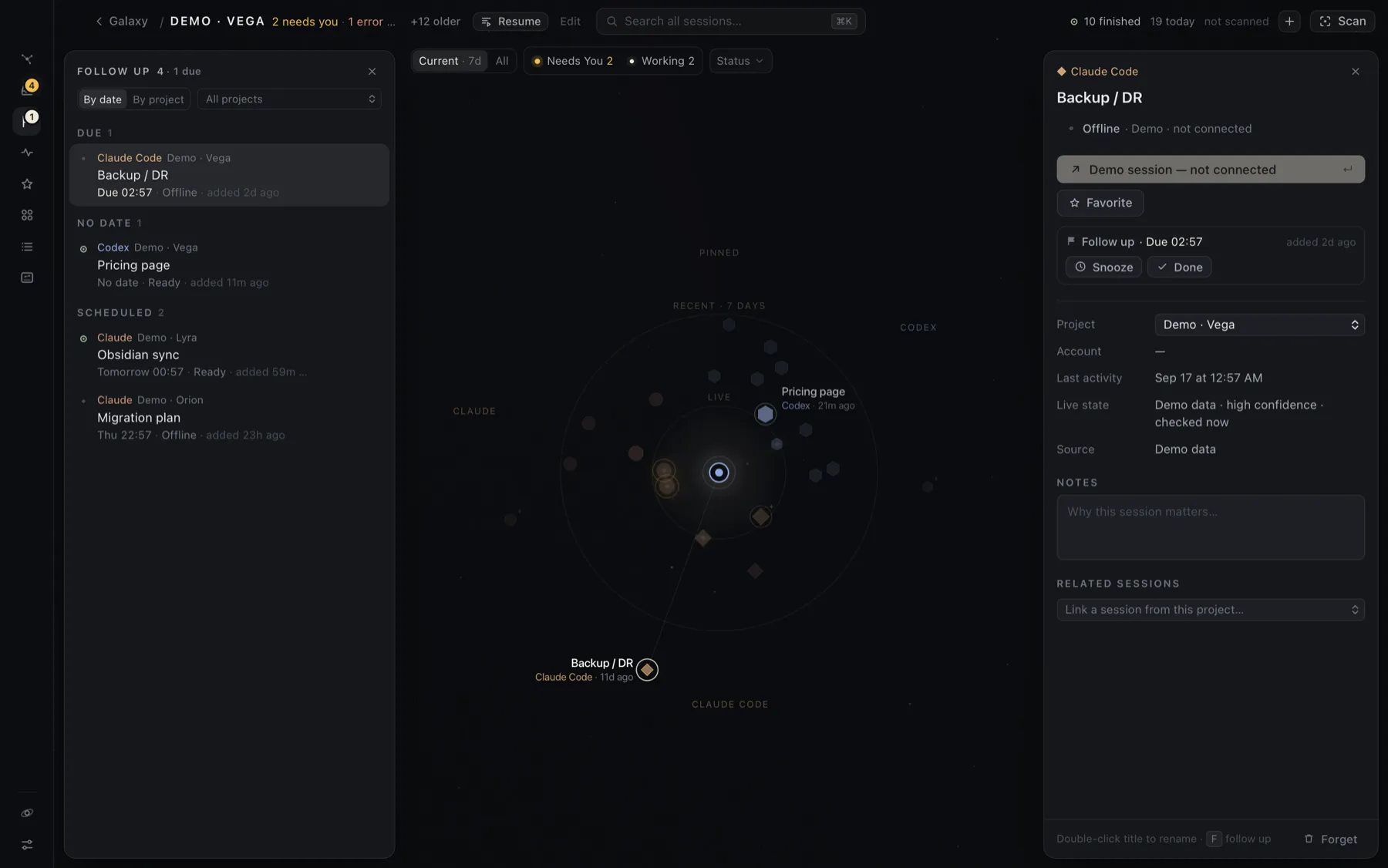
- By date groups it into Due (longest overdue first), No date (in the order you added them) and Scheduled (soonest first).
- By project groups it by project. With several projects, a menu filters to one.
- Each row shows the reminder, the session’s live state, and when you added it, or opened since if you’ve opened the session after adding it. That’s a hint you may be done.
- Hover a row for Remind me later, Done and Open.
Mark it done
Section titled “Mark it done”Press F again on the selected session, or click Done. Hoku says Done. Removed from Follow up, with Undo to put it back exactly as it was.
Sessions in Follow up stay on the Current map even when they’re old, so you can find them where you left them. Forgetting a session also removes its follow-up.