
Sessions and the inspector
The inspector
Section titled “The inspector”Click a session anywhere in Hoku to open its inspector on the right. Esc closes it.
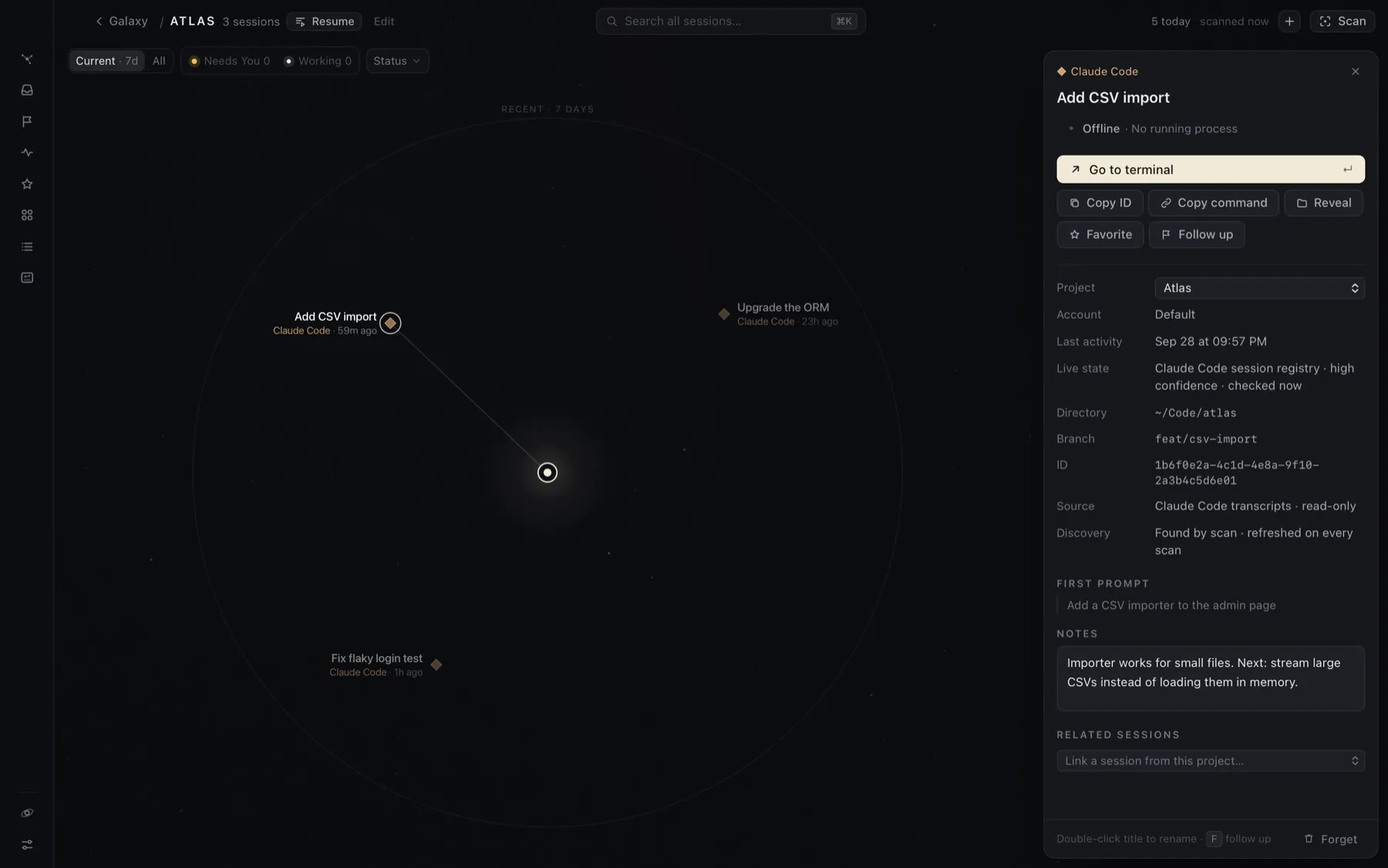
From top to bottom:
- Provider and title. Double-click the title, or click the pencil, to rename it. Your title sticks. Scans never overwrite it.
- State. For example Needs You · Waiting for permission, with what it’s waiting on. Inferred states say so. See Needs You and live status.
- The open button takes you back to the session: Go to terminal, Open thread in Codex, Open in Claude Cowork or Open conversation in Claude. Hover it to see what will happen. ↵ does the same. See Getting back to a session.
- Copy ID, Copy link (Codex and Claude) or Copy command (Claude Code:
claude --resume <id>). Reveal shows the session’s folder in Finder. - Favorite: keeps the session in the Favorites drawer and on the Current map, however old it gets.
- Follow up: puts it on your review-later list. Once it’s there, the inspector shows the reminder with Snooze (or Remind me) and Done.
- Details:
- Project and Account: both can be changed here.
- Last activity
- Live state: where the state comes from, how confident Hoku is, and when it last checked.
- Directory, Repository, Branch and Pull request, when the provider records them.
- Model, and for a running Claude Code session, whether it’s an interactive terminal or a background job.
- ID, deep link and source.
- First prompt: up to 200 characters of how the session started. This is the only part of the conversation Hoku keeps.
- Notes: your own words about why the session matters. They’re saved when you click away, searchable, shown in Resume, and never overwritten by scans.
- Related sessions: link sessions in the same project that belong together, for example a Claude Code session and the Codex thread that reviewed it.
- Forget, at the bottom: removes the session from Hoku only. See Forget a session.
If a session isn’t on the Current map, the inspector says why, for example “no activity in the last 7 days”.
Accounts
Section titled “Accounts”If you use more than one account with a provider (say, Personal and Work), you can label them. Open Integrations, click Manage accounts, and add a label. Then pick the account in a session’s inspector. The Sessions table can filter by account.
Account labels are only names for organizing. Sign-in always stays with each provider’s own app. For Claude, Hoku can show the email that claude auth status reports. For Codex it shows Connected externally, because the account email isn’t available without opening Codex’s credential file, which Hoku never does.
The Sessions table
Section titled “The Sessions table”Sessions in the rail opens a table of every indexed session, including ones hidden from the Current map.
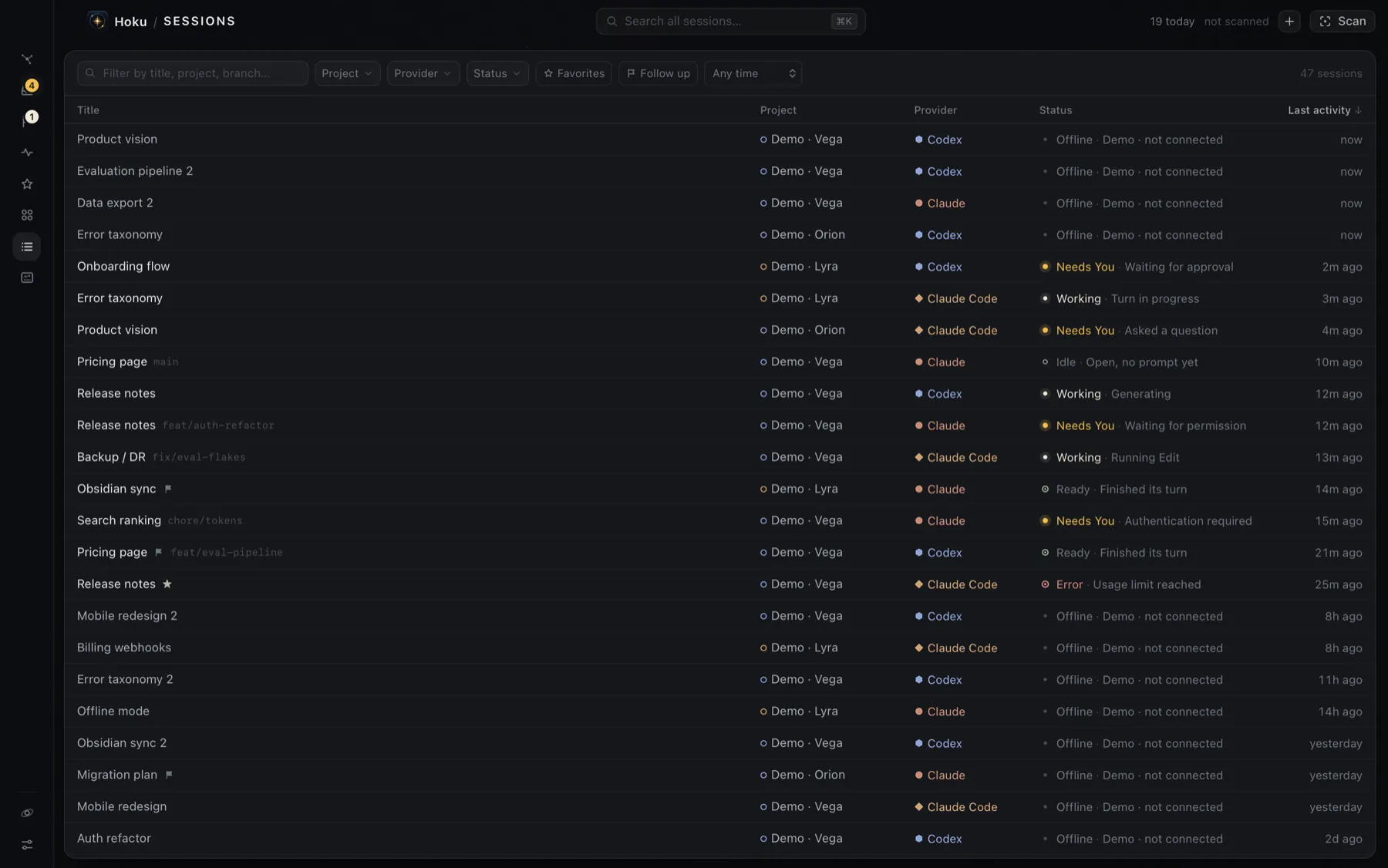
- Filter by title, project, provider, branch or folder, then narrow by Project, Provider, Status, Account, Favorites, Follow up, and Any time / Last 24h / Last 7 days / Last 30 days.
- Sort by any column. Last activity is the default.
- Hover a row for Follow up (or Done) and Show on map. Click a row to open the inspector. Double-click to open the session.
Favorites
Section titled “Favorites”Star a session with Favorite in its inspector, or ⌘D on a result in ⌘K. The Favorites drawer lists them, most recent first. By default favorites always stay on the Current map. You can turn that off in Settings.
Favorites are for sessions you keep coming back to. To come back to a session once and then be done with it, use Follow up.